Obsidian Media Vault
I track the media I consume, that being books, music, movies, series and games. I once had a post on this page going into detail why I did this, but I felt it became a bit too philosophical. Earnestly, I do it because it I like cataloguing things and seeing that catalogue expand.
To this end, I previously used numerous websites for tracking media consumption, those being:
- Rate Your Music for music (mainly albums)
- Letterboxd for movies
- Infinite Backlog for games
- Goodreads and later Bookwyrm for books
But honestly, it was a bit tedious using all these sites. Especially since they all have many gimmicks to keep users coming back and are trying to envelop me in communities I do not want to partake in. Ever since reading Digital Minimalism I have been more thoughtful about the technology/websites I use, what they take from me and what I gain from them. And I have decided that there is a better way.
Obsidian
The note-taking tool Obsidian has been a staple of my digital life since I discovered it in 2022. I already use it for:
- Management of personal projects
- Technical notes
- Long-running task management
- Cheat-sheets
- Reference management
But with the bases functionality introduced recently, I can treat each note in my Obsidian vault as an entry in a database, which opens up the possibility for a whole new type of use-case.1
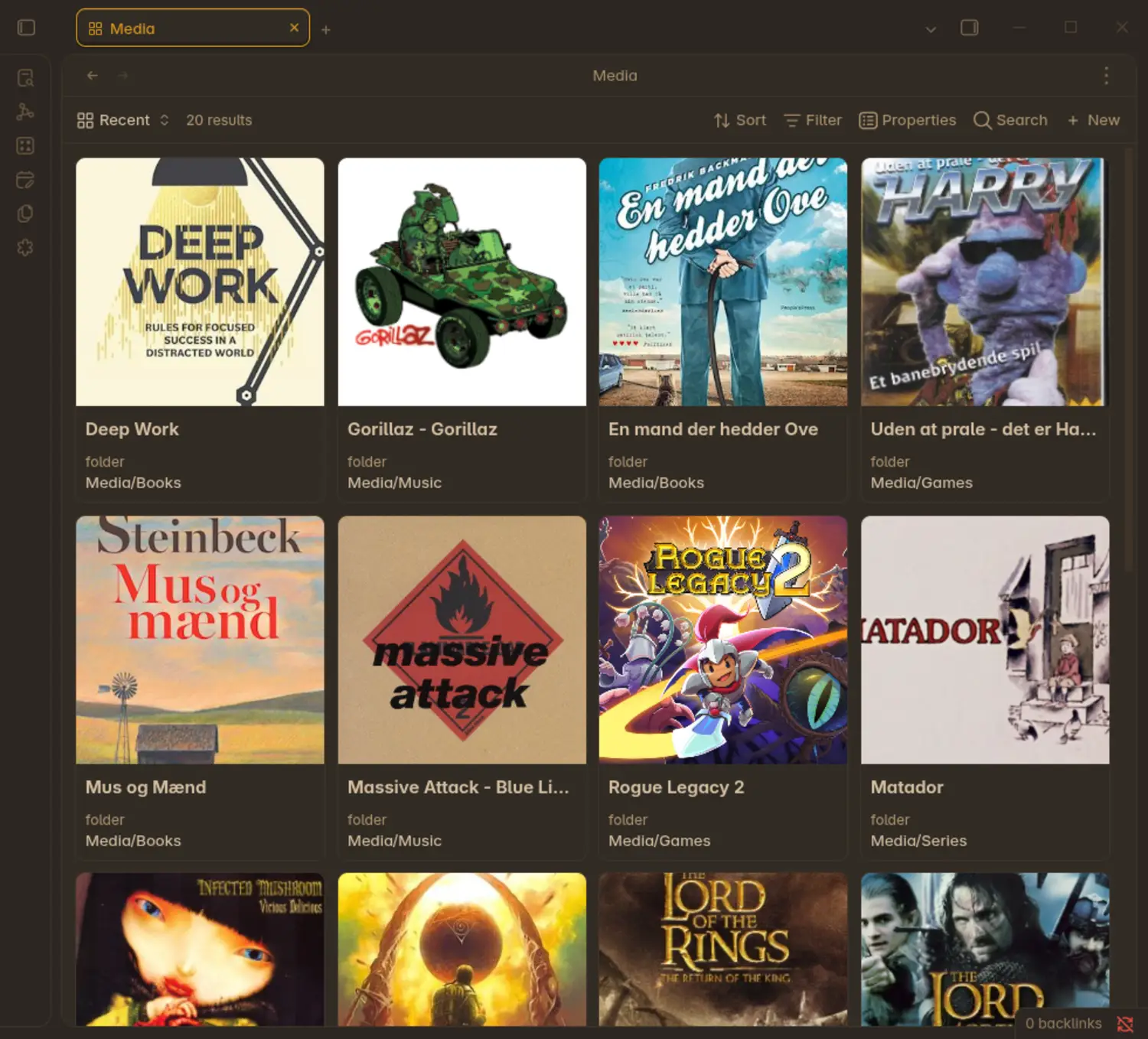
A snapshot of my Obsidian media vault
Each of those small square pictures is a note inside my Obsidian vault. Notes in Obsidian are written in the simple Markdown language, but the metadata which is shown in this table, is obtained from the YAML-frontmatter of each note. It typically looks like this
|
|
This frontmatter lives inside a template. Each new entry in the media vault automatically has this frontmatter, and it is up to me to populate it.
While I could have added more info such as director for movies, or game studio for games, I felt that the top priority of this system, was that it is frictionless for me to use. And it really is… Along with the community extension QuickAdd, adding a new entry is super easy.
Example of me adding a new movie entry to my media vault.
The Obsidian base easily lets me sort my media by
- Type (movies, books, etc.)
- Date
- Rating
or any combination, such as “movies I watched in 2025 with greater than 8/10 rating”.
Pros and cons
Pros:
- My Obsidian vault is just a collection of Markdown files. I own the files and they will never disappear, no matter what happens to Obsidian.
- One major selling point of Obsidian, is the linking between notes. Now I can link directly to a piece of media while writing my journal or some other note.
- It is significantly faster. The functionality also works on my phone, so it is very easy to hold up-to-date.
- I do not get distracted by unnecessary features.
Cons:
- Missing discovery features (I was not using those in the first place).
- Harder to show off to friends to flex on them.
For the last reason, I am still keeping a Rate Your Music account as mine has huge flexing potential. But other than that, I am migrating everything to my new Obsidian media vault.
The technical bit
If you want to set this up yourself, you should do the following:
- Create a new Obsidian template with your desired frontmatter
- Install QuickAdd through the community plugin browser
- Add a new choice to QuickAdd (e.g. Add music), select template path and destination path (I use
Media/Music/) - Create a new Obsidian base and add the following filter for all views:
All the following are true
    where  folder     starts with  Media
    and    extension  is           md
- Then add a new view and under
Configure viewset layout toCardsandImage propertytoimage
That’s it.
-
This functionality was already possible before through community plugins such as
dataview. While that plugin is a lot more powerful, it is definitely not as user-friendly. ↩︎
Published 9. May 2026
Last modified 9. May 2026